

Updated September 2026 with Microsoft’s latest Copilot announcement.
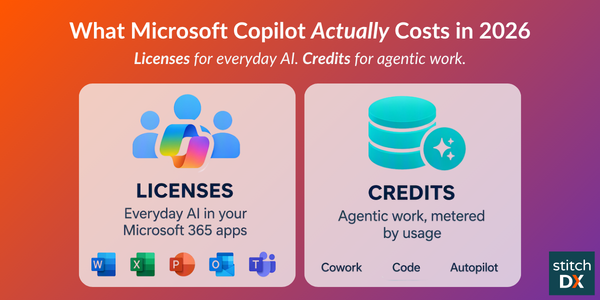
On September 25, Microsoft split Copilot into two budgets. Everyday Copilot — chat, drafts, summaries and analysis in Word, Excel, PowerPoint, Outlook and Teams — stays on a per-user license at a fixed cost. Agentic work — Cowork, the new Code and Autopilot capabilities, and Microsoft’s frontier models — runs on usage-based billing, metered in credits.
That means companies now need to budget for licenses and credit usage. Most organizations are only budgeting for the first one.
Microsoft 365 Copilot brings AI directly into your Microsoft 365 data. With built-in integrations to SharePoint, Outlook, Teams, Word, Excel, PowerPoint and more, Copilot gives you a secure way to apply AI across your users’ knowledge inside your existing digital workplace.
But the pricing changes raise a lot of questions: Does everyone need a Copilot license? What can users do without one? What if only some users have licenses? Are Copilot agents the same as Copilot Chat? And what do the new Cowork, Code and Autopilot capabilities cost?
What changed on September 25
Microsoft announced a new Copilot experience and a new way to pay for it. The short version:
- Two pricing models. The user subscription license (USL) covers everyday AI at a fixed cost: Copilot Chat and Copilot in Word, Excel, PowerPoint, Outlook and Teams, plus model selection. At its center is Auto, which weighs accuracy, speed and cost on each request and routes it to the best-suited model. Usage-based billing (UBB) covers agentic work: Cowork, Code, Autopilot, other long-running agentic capabilities, and frontier models such as Astra and Fable.
- Home. A new starting point in Copilot where Chat and Cowork sit together, with Word, Excel and PowerPoint built in (“Office in Copilot”). Coming soon, Copilot will decide whether a request goes to Chat, Cowork or Code on its own.
- Code. Any employee can describe an app, tracker, dashboard or workflow in plain language and Copilot builds it. Apps run in a sandbox and can be hosted inside your tenant.
- Autopilot (previously called Scout). A persistent agent with its own identity, memory and workspace in your tenant. Give it a name, a role and a goal, and it watches channels, follows up on threads and runs recurring work without waiting for a prompt.
- Copilot Managed Runtime. Hosting infrastructure, governed by IT, that runs apps built in Cowork, Code and Copilot Studio inside your Microsoft 365 environment. Now in preview.
- FinOps for AI. New spend controls across Agent 365, Insights and Copilot (details below).
Timing: Home and Code roll out to Microsoft’s Frontier program first, with Code reaching broad availability in the coming weeks and preview for Microsoft 365 Premium and Pro subscribers later this year. Autopilot enters private preview at the end of September. Most mid-market organizations aren’t in Frontier, which gives you a window to plan before these land.
What each Copilot product actually is
Microsoft has stacked several products under the Copilot brand name, which
can cause confusion. Here’s the plain-English version:
| Product | What it is | What it costs |
|---|---|---|
| Copilot Chat | Free AI chat inside your M365 apps. Web-only knowledge — it can’t see your files or email. | $0, included with most M365 plans |
| Microsoft 365 Copilot | The paid assistant (the user subscription license). Reads your files, email and Teams chats. Drafts, summarizes and answers questions grounded in your data. Includes Auto model routing. | $21–$30/user/month, on top of a base M365 plan |
| Copilot Studio | The builder. Where you (or IT) create custom agents — an HR bot, an onboarding assistant, a customer FAQ bot. | Free to build; running the agent is metered separately |
| Copilot Cowork | Work you delegate. You define the task, and it runs end to end and returns a finished result: an RFP response, a customer briefing, a financial close package. Now lives in Copilot Home. | Requires a Copilot seat; usage follows the Copilot Studio credit model |
| Copilot Code (new) | Describe an app, dashboard or workflow in plain language and Copilot builds it, then hosts it in your tenant to share with your team. | Usage-based billing (credits) |
| Autopilot (new) | A persistent agent with its own identity, memory and workspace. Works toward a goal on its own — watching channels, following up, running recurring work — while you do something else. | Usage-based billing (credits); private preview |
| Agent 365 | Not an AI tool. It’s IT’s control panel for every agent in the company — who owns it, what it can access, whether it’s been compromised — and now where AI spend is managed. | $15/user/month, or bundled into E7 |
| M365 E7 “Frontier Suite” | A bundle: E5 + Copilot + Agent 365 + Entra security in one SKU. | $99/user/month |
In the simplest terms: Copilot answers questions, Cowork finishes work you hand off, Code builds apps, Autopilot works on its own, Copilot Studio builds custom agents, and Agent 365 governs and budgets all of it. E7 bundles most of it together.
Keep in mind that Copilot is an add-on. Users need a base Microsoft 365 plan to use it, so the real cost of a license isn’t $30/month:
E3 + Copilot: ~$69/user/month
E5 + Copilot: ~$90/user/month
Business Standard + Copilot: ~$32–35/user/month
What a Copilot license covers, and what it doesn’t
Microsoft’s September announcement makes the line explicit. A Copilot seat covers everyday AI at a fixed cost. Everything outside that boundary is metered in Copilot Credits, Microsoft’s billing unit for AI work. Credits are priced at $0.01 each pay-as-you-go, or $200 for a 25,000-credit pack per month.
Covered by your seat, no extra charge:
- Copilot in Word, Excel, PowerPoint, Outlook and Teams, for the person who holds the license
- Auto model routing and standard model selection
- That same person using an internal agent built in Copilot Studio, SharePoint or Teams
Not covered — always metered, license or no license:
- Cowork tasks, apps built with Code, and Autopilot agents
- Frontier models such as Astra and Fable
- A colleague without a Copilot license using an agent that touches your SharePoint or company data
- Any agent open to customers or the public
- An agent that acts on its own — checking a mailbox, triggering a workflow — with no person prompting it
- A custom agent that calls outside AI models directly (a separate Azure bill, on top of Copilot Credits)
The practical rule for IT: an internal chatbot for licensed employees is basically free. The moment you open it to unlicensed staff, take it outside the company, let it act on its own, or hand it a multi-step task through Cowork or Autopilot, you’ve crossed into metered territory.
The unlicensed-user rule is one of the biggest changes Microsoft made in 2026. When an employee who has a Microsoft 365 license but no Copilot license uses a chatbot you built in Copilot Studio, that usage consumes credits.
Want to see what your mix of seats and agents will cost? Try the Copilot Cost Calculator →
What a credit actually buys
This is the part that makes your “simple chatbot” a moving target. Not every interaction costs the same, and costs stack within a single answer, let alone a single conversation.
| Action | Credits |
|---|---|
| Scripted, pre-written answer | 1 |
| AI-generated answer | 2 |
| Looking up your company data (SharePoint, email, files) | 10 |
| The agent taking an action (a connector or tool call) | 5 |
| The agent acting on its own, unprompted | 25 — every single time |
| A heavier “reasoning” response | +100 credits per 10 responses |
A single answer that both looks up company data and generates a response isn’t 2 credits — it’s 10 + 2 = 12 credits. Add a couple of actions and you’re past 20. That’s why a “simple FAQ bot” and an “agent that does things” can have very different bills with the same number of users asking questions.
Look at the most expensive line on that table: an agent acting on its own. That’s the whole point of Autopilot. It’s built to work without a prompt, which is exactly why Microsoft put it on usage-based billing.
A real comparison: chatbot vs. multi-agent tool
A basic internal HR chatbot, answering licensed employees from a SharePoint knowledge base and doing nothing on its own: $0 in credits. Your existing seats cover it.
The same bot opened to unlicensed staff: roughly 12 credits per exchange. At 5,000 conversations a month, that’s 60,000 credits, about $600/month pay-as-you-go (or three 25,000-credit packs). And that’s a simple chatbot.
A multi-agent tool — one agent that checks inventory, confirms shipping and sends a confirmation email — stacks the cost of every step. Microsoft’s example uses four actions at 5 credits each: 20 credits for one completed task. Add lookups and generation around each step and a single workflow can run 40–80+ credits. At 2,000 completed workflows a month, that’s 80,000–160,000 credits, or roughly $800–$1,600/month. Let the agent trigger itself and the number climbs further — every unprompted run adds 25 credits before it does any work.
Now picture the September announcements at scale: dozens of employees delegating tasks to Cowork, building their own apps in Code, and running Autopilot agents around the clock. Every one of those draws from the same credit meter.
Model your own chatbot, workflow and agent scenarios. Try the Copilot Cost Calculator →
New controls for managing AI spend
Microsoft paired the pricing change with what it calls FinOps for AI — tools to keep usage-based spend in check:
- Cost management in Agent 365 now covers Cowork, Work IQ APIs, Code and Copilot Managed Runtime. Copilot Studio agents are planned for October.
- Spending policies at scale. Admins can set policies through an API and route employees’ credit requests into existing approval workflows.
- Model controls by group. IT decides which model families each group can use, which also limits what Auto can pick.
- Outcome reporting. Leaders can see which Cowork tasks produce the strongest results and decide where to expand or cut back.
- User visibility. Employees can see their own credit usage, remaining balance and history directly in Copilot.
These controls cap spending. They don’t reduce the work an agent has to do. An agent pulling from one current, owned policy document finishes in a few steps. An agent sorting through five versions of that policy across three SharePoint sites burns credits deciding which one to trust — and may still pick the wrong one. AI doesn’t fix broken knowledge — it amplifies it. Under usage-based billing, you also pay for it.
The bottom line for a mid-market company
Justifying the cost of Copilot comes down to knowing what you plan to use it for and how engaged your employees will be. If deploying Copilot to every user isn’t feasible, start by assessing the use cases for chatbots, automations and workflows.
If you have 200–2,000 employees, are standardized on E3, and are rolling out Copilot to most of the organization, plan two budget lines:
- Seats: budget ~$69/seat/month as your real number, not $30.
- Credits: set aside a separate pool for agentic work — Cowork, Code, Autopilot and any agent used by unlicensed staff or customers.
Then sequence the rollout:
- Build your first agents as internal-only, employee-facing tools. That’s the one category your existing seats fully cover.
- Set spending policies and model controls in Agent 365 before turning on Cowork, Code or Autopilot.
- Pilot agentic work with a small group, measure credits per completed task, then scale what pays off.
- Clean up the content your agents will read. Current, owned, well-permissioned knowledge is the cheapest cost control you have.
Before you set your budget, run the numbers. Try the Copilot Cost Calculator →